---
updatedAt: 2026-04-14T20:56:20.000Z
agentTools:
projectIndex: https://snipe-it.readme.io/llms.txt
---
# Restore from Backup File
Restoring from a known-good backup from the command line
**Unless you've lost access to your Snipe-IT UI, you can use the[Backup and Restore tool](https://snipe-it.readme.io/docs/backups) within the GUI and skip this part.**
> ❗️ NOTE:
>
> This command is intended for **official Snipe-IT generated backups ONLY**. If you are trying to restore from a manually generated database and filesystem backups (using PHPMyAdmin, `mysqldump`, etc), this command will not work unless you recreate the structure of the zip file that Snipe-IT generates.
If you have a previously generated Snipe-IT backup file that you'd like to restore back to (for example, if you did a backup right before a big LDAP sync, and you realized the sync wasn't configured correctly and you need to roll that back), you can use the command-line utility to restore it to a known good state:
```
# Restore from backup file on the server
$ php artisan snipeit:restore /full/path/to/your/backup.zip
```
There are a few additional optional parameters you can also use.
### Force Restore (no interaction)
```
# Restore from backup file on the server without interaction
$ php artisan snipeit:restore /full/path/to/your/backup.zip --force
```
This will force the restore without asking you to confirm by typing `Yes` after the prompt.
### No Progress Bar
```
# Restore from backup file on the server without a progress bar
$ php artisan snipeit:restore /full/path/to/your/backup.zip --no-progress
```
This will hide the progress bar in the terminal.
### Run Migrations
After the restore, run:
```
# Run database migrations
$ php artisan migrate
```
## Assembling a Snipe-IT Compatible Backup File
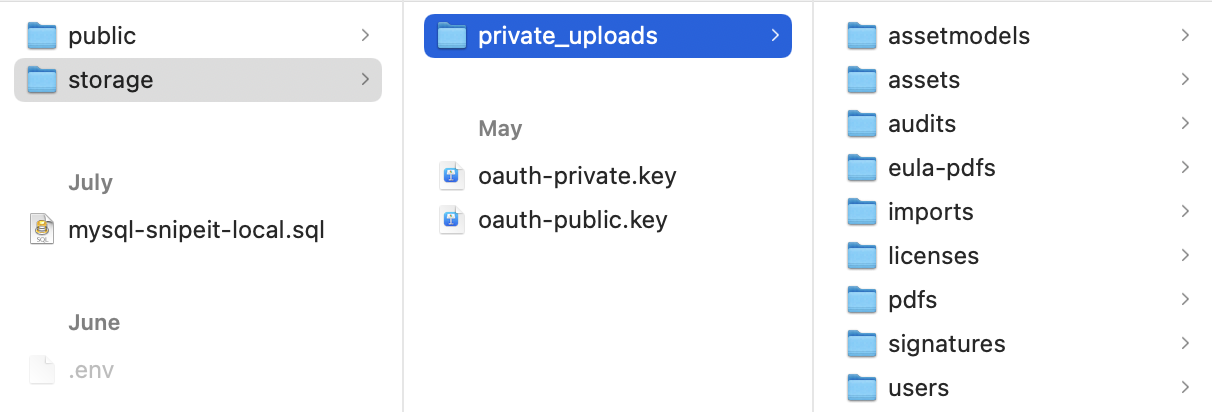
If for some reason you can't get the Snipe-IT-generated backup to work (and for example have to do a manual database dump, etc), the file structure Snipe-IT is expecting in the .zip file you can assemble it yourself:
* SQL file should be at the top level. It can be named anything, but must end in `.sql` and there must only be one.
* You should have a `public/uploads` directory (with subdirectories) and a `storage/private_uploads` directory (with subdirectories).
* Anything else in the zip file will be skipped.