/hardware

Creates a new asset

To update the values of custom fields, use the DB Field Name value in your Settings > Custom Fields for the field you want to update.
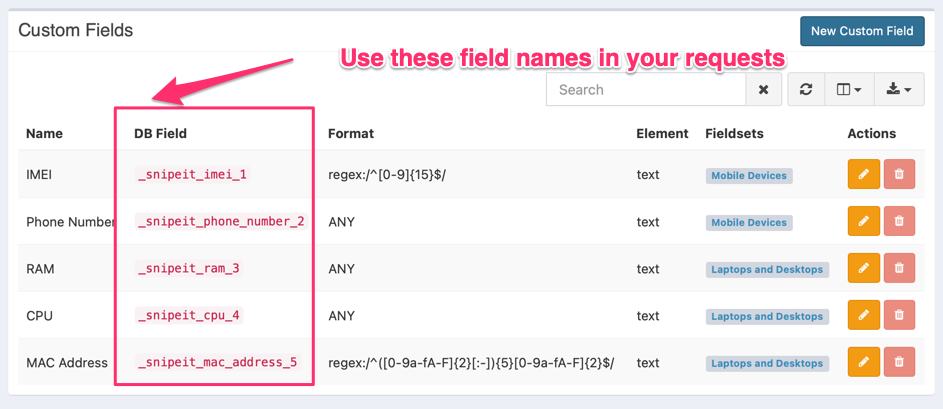
943

If you don't see that column, be sure to use the column selector to un-hide it:
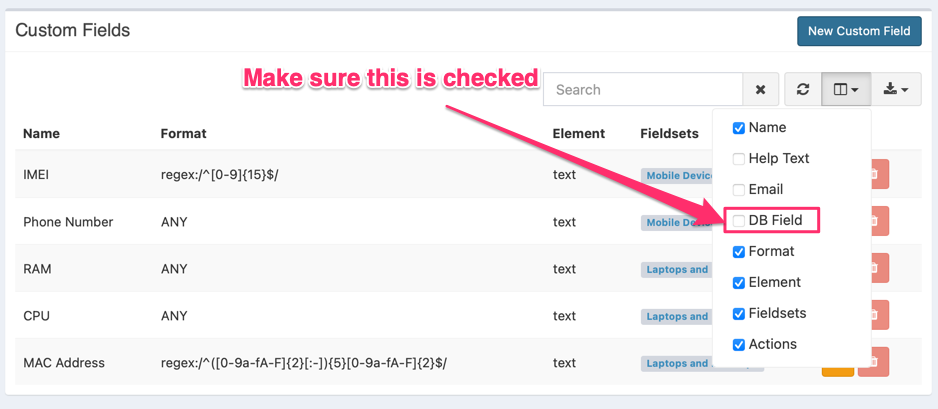
938

You can do a checkout on creation if you add one of the following fields: assigned_user, assigned_asset, or assigned_location. This should be a valid primary key of the user, asset or location you wish to checkout to.

Body Params
string
required

The asset tag of the asset. If auto-incrementing is enabled in the settings, this is not required and will be generated.

int32
required

The id of the related status label

int32
required

The id of the related asset model

string

Asset name

string

data:[mime/type];base64,[base64encodeddata]

string
date
float
string
string
boolean
Defaults to false
int32
Defaults to null
boolean
Defaults to false
int32
Defaults to null
boolean
Defaults to false
int32
Defaults to null

The corresponding location_id from a location in the locations table that should indicate where the item is when it's NOT checked out to someone

date
int32
Defaults to null
boolean
Headers
string
enum
Defaults to application/json

Generated from available response content types

Allowed:
Responses

Language
LoadingLoading…
Response
Click Try It! to start a request and see the response here! Or choose an example:
application/json
text/plain