/hardware/:id

To update the values of custom fields, use the DB Field Name value in your Settings > Custom Fields for the field you want to update.
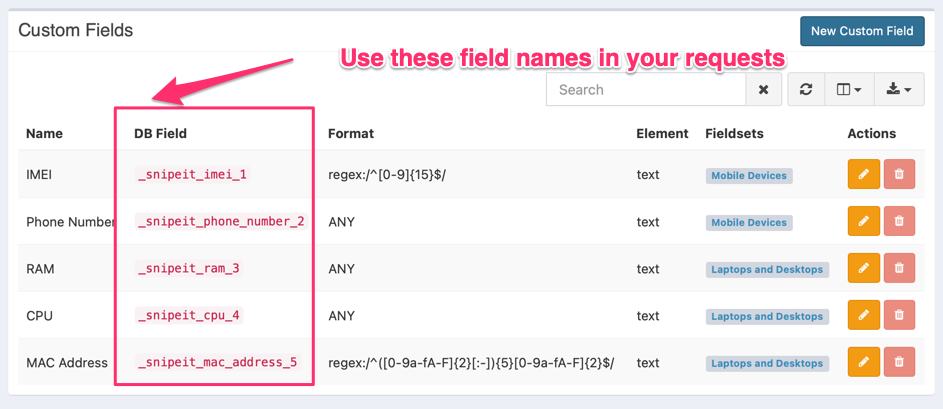
943

If you don't see that column, be sure to use the column selector to un-hide it:
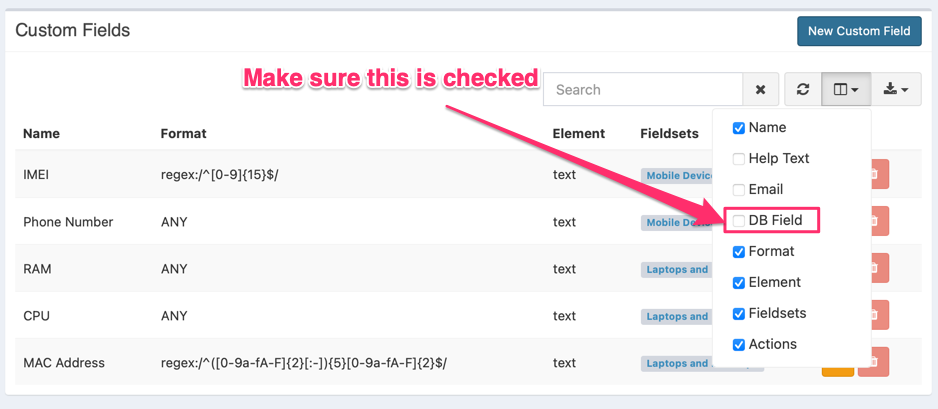
938
Path Params
int32
required
Body Params
string
required
int32
required
int32
required
string
date
Defaults to null
int32
Defaults to null
int32
Defaults to null
int32
Defaults to null
int32
Defaults to null
string
Defaults to null
string
int32
Defaults to null
float
Defaults to null
date
Defaults to null
boolean
Defaults to false
boolean
Defaults to false
int32
Defaults to null
string
Defaults to null
int32
Defaults to null
file
Defaults to null
int32
Response

Language
LoadingLoading…
Response
Click Try It! to start a request and see the response here! Or choose an example:
application/json